

Best Photocopiers and Printers for Offices: Types and Prices
Many business owners and copy center operators make a common mistake when purchasing photocopiers and printers: focusing solely on the upfront purchase price while ignoring long-term operating and maintenance costs. High-consumption toner cartridges, replacement parts, and sudden equipment breakdowns can quickly accumulate into unexpected overhead expenses that eat into business profits.
Selecting the cheapest machine rarely equates to securing the best deal. Choosing a model that doesn't align with your daily workload can lead to significantly higher operating and maintenance costs over time.
In this comprehensive guide from East Automation, we help you make an informed decision. We compare different equipment categories, evaluate toner yields and per-page costs, compare top brands, and offer practical guidelines to help you choose the ideal system that balances purchase price, operating expenses, and daily productivity.
How to Determine Your Needs Before Buying Photocopiers and Printers
Before investing in photocopiers and printers, it is essential to calculate your actual monthly usage and expected operating expenses so you don't pay for features you don't need or purchase an underpowered machine.
Calculating Monthly Duty Cycle
Calculate your average daily page count and multiply it by your working days per month. For example: 200 sheets per day $\times$ 26 working days = 5,200 sheets per month.
We recommend selecting a machine rated for a higher monthly duty cycle than your calculated usage. Running a device below its maximum capacity prevents unnecessary mechanical stress and extends its operational lifespan.
If you are planning to buy a new printer, check our printer price in egypt guide to compare popular models and available options.
Per-Page Cost and Total Cost of Ownership (TCO)
The true cost of photocopiers and printers extends beyond the initial purchase price to include toner, replacement parts, and ongoing service over its lifetime. Calculate your per-page cost by dividing the cost of a toner cartridge by its total page yield, then factor in routine maintenance expenses.
Always verify the local availability of toner cartridges and spare parts before making a purchase. Choosing a brand and model supported by readily available local inventory minimizes downtime and keeps long-term operating costs manageable.
Brand Comparison: Xerox vs. Ricoh Photocopiers and Printers
When evaluating top global brands, Xerox and Ricoh emerge as the primary choices for businesses, schools, and commercial print shops across Egypt and the Middle East. However, each brand targets specific operational priorities.
Xerox Photocopiers and Printers: Pros and Cons
Xerox is a pioneer in document technology, focusing heavily on fine print quality, enterprise software integration, and advanced network performance.
- Advantages:
- Superior Print Quality and Data Security: Delivers sharp text clarity and precise color calibration, alongside advanced data encryption features.
- Rapid File Processing: Efficiently handles large PDF files, complex graphics, and heavy architectural documents.
- Heavy-Duty Construction: Select commercial lines feature rugged chassis built for heavy duty cycles, making them ideal for corporate environments.
- Disadvantages:
- Relatively higher costs for genuine OEM toner cartridges and spare parts.
- Maintenance costs can be higher, with specialized technicians required for specific models.
Ricoh Photocopiers and Printers: Are They Best for Copy Centers?
Yes, Ricoh machines are widely favored by copy centers, student service hubs, and commercial print shops operating under heavy daily workloads. Ricoh builds practical, reliable equipment focused on lowering per-page print costs and ensuring widespread spare parts availability.
Why Ricoh Leads in Copy Centers and Student Hubs:
- Widespread Parts and Toner Availability: Consumables and maintenance parts are widely available locally at competitive prices.
- Serviceable Design: Intuitive mechanical layouts facilitate fast troubleshooting and routine repairs.
- Low Per-Page Cost: Significantly reduces cost per copy, making it ideal for high-volume daily operations.
- Versatile Model Selection: Popular series like the Ricoh MP 3054/3554 and Ricoh MP 5054/6054 cater to continuous high-volume print environments.
Key Takeaway: If your priority for photocopiers and printers centers on advanced graphic reproduction, software integrations, and data security, Xerox is an excellent choice. If your goal is heavy workload endurance, low per-page costs, easy maintenance, and cheap consumables, Ricoh is generally the most practical solution for copy centers and high-volume hubs.
Choosing the right printer depends on your needs and budget, so explore types of photocopiers before making your final purchase.
Renting vs. Buying Photocopiers and Printers: Which Saves More?
Your financial liquidity and monthly usage volume determine whether buying or leasing is best for your business. There is no single "best" option—only the one that aligns with your budget and operational model.
Buying Equipment
You pay the full capital cost of the machine upfront to own the asset while covering consumables, maintenance, and operating expenses.
- Advantages:
- Greater Long-Term Savings: Offers lower total costs over a 3-to-5-year operational lifecycle.
- Capital Asset: Adds physical assets to company balance sheets.
- Resale Value: Allows the flexibility to sell or trade in equipment when upgrading.
- Disadvantages:
- Requires significant upfront capital expenditure, impacting cash reserves.
- Your business bears full responsibility for repair bills, maintenance, and asset depreciation.
- Best For: Businesses with healthy capital reserves, stable monthly print volumes, and long-term operational plans.
Renting Equipment
Your company pays a predictable monthly fee to use the equipment. Leasing contracts typically cover routine maintenance, technical service, and toner cartridges, while paper remains the lessee's responsibility.
- Advantages:
- Preserves Cash Liquidity: Eliminates large upfront capital investments.
- Predictable Budgeting: Consolidates service, repair, and toner expenses into a fixed monthly cost.
- Easy Upgrades: Enables seamless transitions to newer equipment models when lease terms expire.
- Disadvantages:
- Cumulative lease payments over several years can exceed the total purchase price of the machine.
- Fixed monthly fees remain due even during periods of low monthly print activity.
- Over-age penalties may apply if monthly page allowances are exceeded.
- Best For: Startups, short-term projects, companies preserving cash reserves, or businesses with fluctuating print needs.
For more information about printer models, features and costs, visit our hp compact printer guide and compare your options.
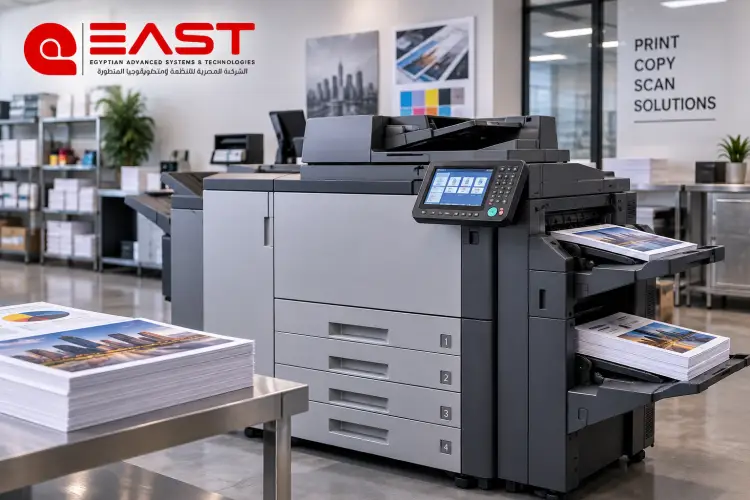
Market Options and Prices for Photocopiers and Printers in Egypt
Choosing the right photocopiers and printers depends on three primary variables: daily page volume, output type (monochrome vs. color), and your allocated capital budget. The Egyptian market offers options across top brands like Ricoh, Xerox, and Canon to suit corporate offices, schools, and commercial copy hubs.
Leading Brands and Market Options
Ricoh: Top Choice for Copy Centers and Commercial Hubs
Ricoh leads commercial sales in the copy center sector thanks to its heavy-duty mechanical endurance, low per-page cost, and widespread availability of parts and toner.
- Ricoh MP 3055 (Monochrome): Starts around 30,000 EGP.
- Ricoh MP C3004 (Color): Ranges around 30,000 EGP depending on machine condition and refurbishing specs.
Xerox: High Versatility and Exceptional Durability
Xerox supplies comprehensive document solutions ranging from small desktop units to heavy-duty production press setups.
- WorkCentre Series (5755 / 5855 Refurbished Imports): Prices range between 18,000 and 35,000 EGP.
- Commercial Production Press Series: Pricing scales higher based on inline finishing accessories and engineering specs.
Canon: Precise Color Calibration and Corporate Reliability
Canon's imageRUNNER series targets corporate environments seeking sharp color accuracy, intuitive touch interfaces, and balanced operational performance.
- Canon iR 2425i: Priced around 60,000 EGP.
- Canon iR 2730i: Priced around 120,000 EGP depending on finishing attachments and warranty terms.
Frequently Asked Questions (FAQ)
Is it better to buy new or imported refurbished photocopiers and printers?
Imported refurbished machines represent the most cost-effective choice in the Egyptian market, offering commercial-grade hardware at a fraction of the cost of new models. Buying from a reputable vendor like East Automation ensures thorough technical inspections and warranty coverage. Brand-new machines are best suited for large corporations or government institutions requiring the latest technological features and factory warranties.
How do I calculate the exact cost per printed page?
Calculate page cost using this formula:
Example: If a toner cartridge costs 1,000 EGP and yields 20,000 pages, the base toner cost is 0.05 EGP (5 Piastres) per page. Add paper cost and maintenance allowances to determine your total per-page cost.
Are spare parts and toner for Xerox and Ricoh easily available in Egypt?
- Ricoh: Consumables, toner, and replacement parts are widely available across the local market, making servicing fast and economical for high-volume users.
- Xerox: OEM parts and toner cartridges are readily available through authorized channels, though they generally carry higher price points and may require specialized technicians for servicing.