


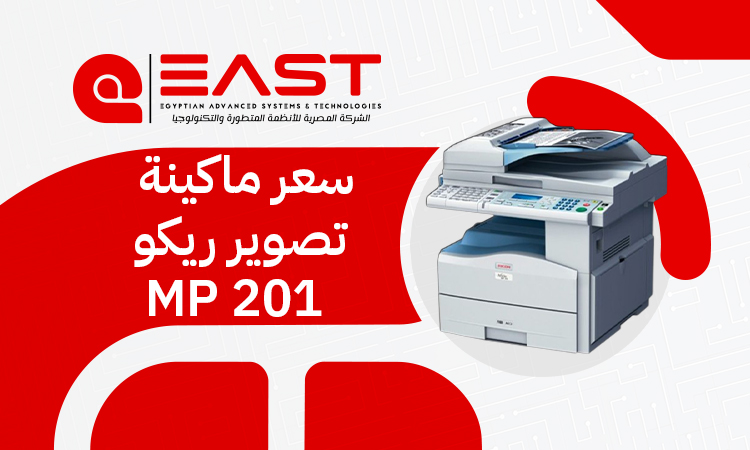
MP 201 Ricoh Copier Price 2026: Features, Benefits, and Cost
Are you tired of skyrocketing office printing costs and unreliable desktop printers that jam right before an important meeting? For small businesses, startups, and legal firms, finding a document solution that balances professional output with strict budget limits can feel like an impossible task. Enter the mp 201 ricoh—a robust, black-and-white multifunction monochrome printer that has quietly become the backbone of productive offices across Egypt. Renowned for its exceptional durability, low maintenance costs, and practical design, this machine offers an all-in-one remedy for daily document workflows without breaking the bank.
In the current Egyptian marketplace, the average price for a refurbished imported or "Zero-wear" unit ranges approximately between 6,000 EGP and 8,500 EGP. This price point fluctuates based on the machine's overall mechanical condition, total page count (odometer), and included accessories. To secure the most accurate, up-to-date pricing and reliable post-sale support, it is highly recommended to contact East Automation, a leading provider of premium office imaging solutions.
Why the MP 201 Ricoh is a Practical Office Choice
When business owners search for a budget-friendly copy machine, the mp 201 ricoh consistently tops the recommendation lists. But what exactly keeps this specific model so popular in a rapidly evolving tech market?
The answer lies in its sheer reliability. Unlike modern, overly complex smart printers that require frequent software updates and expensive specialized chips, this machine focuses on heavy-duty mechanical endurance. It is built to handle continuous daily workflows smoothly, making it an indispensable asset for fast-paced administrative environments that require consistent uptime.
Key Features of the Ricoh MP 201
Investing in office hardware requires a clear understanding of its value proposition. The following features highlight why this model remains a staple in professional workspaces:
- All-in-One Multifunctionality: It seamlessly combines printing, copying, and scanning capabilities into a single, compact footprint. This eliminates the financial burden and space requirements of purchasing multiple individual devices.
- Highly Economical Operating Cost: Designed with a focus on affordability, it features exceptionally low toner consumption. Furthermore, spare parts and consumables are widely available at highly competitive prices. You can contact us anytime to check current market rates for the mp 201 ricoh.
- Efficient Speed Performance: Delivering print and copy speeds of up to 20 to 21 pages per minute (ppm), the device ensures minimal waiting time for critical business documents.
- Built-in Network Capabilities: Equipped with standard network connectivity, it allows multiple employees within a local office network to share the printing and scanning functionalities effortlessly.
- Crisp Output Quality: It produces sharp texts and clear graphics, ensuring all your contracts, financial sheets, and official letters look thoroughly professional.
- Space-Saving, Compact Design: Its ergonomic dimensions allow it to fit comfortably on small desks or dedicated utility stands, making it perfect for space-constrained offices.
Best Target Audiences for This Model
The versatile design of the mp 201 ricoh makes it uniquely suited for several specific professional sectors:
1. Small Business es and Startups
Startups need to maximize their operational capital. This machine provides them with essential, high-volume document processing capabilities without the heavy upfront investment required by larger enterprise consoles.
2. Law Firms and Legal Practices
Legal offices deal with massive volumes of paperwork, case files, and multi-page contracts daily. The reliable document feeding and quick duplexing features of this model make it a trusted partner for legal professionals.
3. Accounting and Financial Offices
From printing intensive tax ledgers to duplicating invoices, accounting departments require clear, smudge-free text outputs. This machine handles dense spreadsheets and financial reports with absolute clarity.
4. Copy Centers and Student Services
For small-scale stationery shops or educational service kiosks, having a low cost-per-page is crucial for profitability. This unit ensures excellent profit margins on standard black-and-white copy services.
Technical Specifications: A Closer Look
Understanding the precise specifications of the mp 201 ricoh helps businesses assess its capacity to meet daily operational demands.
|
Feature |
Specification Details |
|
Print & Copy Speed |
Up to 21 pages per minute (A4 Mono) |
|
Print Resolution |
$600 \times 600$ DPI (Dots Per Inch) |
|
Supported Paper Sizes |
A4, A5, A6 |
|
Standard Paper Capacity |
250-sheet main tray + 100-sheet bypass tray |
|
Automatic Document Feeder (ADF) |
50-sheet capacity |
|
Automatic Duplexing |
Standard double-sided printing |
|
Connectivity Interface |
USB 2.0 port & RJ-45 Ethernet LAN port |
|
Monthly Duty Cycle |
Up to 12,000 impressions per month |
The 21 ppm speed significantly cuts down document processing delays. Additionally, the standard 250-sheet tray combined with the 100-sheet bypass feed offers excellent flexibility for handling different media types. The integrated 50-sheet Automatic Document Feeder (ADF) enables users to scan or copy large, multi-page dossiers completely unattended.
Current Market Pricing in Egypt
Because it is a highly sought-after model, pricing for the mp 201 ricoh can vary across the Egyptian market.
Refurbished and Imported Units (Estirad)
Since brand-new production lines for older legacy models phase out over time, the highest market demand centers around high-grade imported units, often referred to locally as "Kaser Zero." These machines generally retail between 6,000 EGP and 8,500 EGP.
Primary Price Determinants:
- Internal Odometer (Page Count): Units with lower overall lifetimes copy counts naturally command a premium because their internal mechanical components have experienced less wear.
- Component Fitness: The physical state of the drum unit, the fusing assembly, and the rubber pickup rollers directly influences the overall market valuation.
- Warranty Packages: Purchasing a unit backed by a certified corporate warranty and a dedicated technical support contract yields a slightly higher initial cost but offers immense long-term peace of mind.
Mp 201 Ricoh Price: Affordable Excellence for Modern Offices
When evaluating the overall financial impact of adding a new copier to your workspace, the Ricoh MP 201 price stands out as one of its most compelling advantages. Finding an office appliance that balances a low initial purchase cost with minimal long-term operating overhead is rare. Fortunately, this model delivers exactly that, making it a highly sustainable investment for startups, small businesses, and growing legal or accounting practices across Egypt.
Detailed Running and Operational Costs
The primary reason why companies choose the mp 201 ricoh over standard inkjets or smaller desktop cartridges is the incredibly low total cost of ownership (TCO).
Toner Cartridge Yield and Capacity
The system utilizes the highly popular 1270D toner cartridge, which is widely stocked across Egypt. A single standard toner bottle provides an impressive yield of approximately 7,000 pages, assuming standard page coverage layouts.
Cartridge Pricing and Maintenance Availability
An aftermarket or high-quality compatible toner bottle costs roughly between 300 EGP and 350 EGP. Because the machine enjoys a massive user base nationwide, sourcing replacement toners or specialized internal gears is entirely hassle-free.
Exact Cost-Per-Page Analysis
When you divide the cost of the toner cartridge by its average yield, the operational ink cost per individual printed page comes out to just about 4 to 5 Piastres (0.04 to 0.05 EGP). This rock-bottom pricing makes it one of the most financially sustainable options for any business that relies heavily on daily paper documentation. To explore tailored leasing or bulk purchase options, feel free to reach out to East Automation for the best deals on the mp 201 ricoh.
Pros and Cons of the Ricoh MP 201
An honest evaluation of any office appliance requires weighing its strengths against its inherent limitations.
Advantages (Pros)
- Heavy Duty Endurance: Effortlessly sustains standard operational loads up to 12,000 copies monthly without overheating or suffering frequent breakdowns.
- Inexpensive Parts Sourcing: Mechanical components are readily available, keeping routine repair bills exceptionally low.
- Standard Duplex Support: Automatic double-sided printing slashes paper consumption expenditures by up to 50%.
- User-Friendly Control Interface: Features an intuitive button layout and a clear display that simplifies operation for non-technical office staff.
Limitations (Cons)
- Monochrome Output Only: The system cannot print or scan in color; it is strictly dedicated to black-and-white documents.
- No Native A3 Support: It is engineered exclusively for standard office sizes like A4, A5, and A6. If your enterprise requires large-scale engineering blueprints or wide ledger prints, this unit will not fit that specific need.
- Legacy User Interface: It features physical buttons and a basic digital screen rather than the modern, smartphone-style color touchscreens found on newer generations.
Head-to-Head Comparison: Ricoh MP 201 vs. Ricoh MP 301
If you are currently evaluating your next office upgrade, you might find yourself choosing between the mp 201 ricoh and its successor, the Ricoh MP 301. Below is a structured comparison to help clarify your purchasing decision:
|
Feature/Metric |
MP 201 Model |
MP 301 Model |
|
Print Speed |
21 Pages Per Minute |
30 Pages Per Minute |
|
Control Panel |
Traditional Digital Screen & Physical Buttons |
Full-Color Smart Touchscreen Interface |
|
System RAM |
640 MB |
1 GB (1,024 MB) |
|
Large File Processing |
Standard performance for basic text |
Faster processing speeds for graphic-heavy PDFs |
|
Energy Efficiency |
Standard power consumption |
Enhanced eco-friendly power-saving modes |
|
Price Tier |
Highly budget-friendly; minimal initial capital |
Higher cost tier; requires a larger upfront investment |
Which One Should Your Office Choose?
You should opt for the mp 201 ricoh if your main priority is securing a dependable, highly economical workspace copier with ultra-low toner costs for straightforward, daily administrative tasks.
Conversely, you should consider upgrading to the Ricoh MP 301 if your office experiences larger workloads that require faster print speeds, a modern touchscreen interface, and snappier processing for massive, complex PDF files.
Frequently Asked Questions (FAQs)
Can I connect this machine directly to my office network?
Yes. The mp 201 ricoh comes standard with a built-in Ethernet LAN connection. This allows you to plug the machine directly into your office network router, enabling every computer in your office to utilize print and scan functions seamlessly.
How do I download and install the proper printer drivers?
To install your device successfully, follow these straightforward steps:
- Open your web browser and search for: "Ricoh MP 201 drivers download". Ensure you access the official, secure Ricoh support portal.
- Select your specific operating system (e.g., Windows 10 or Windows 11) along with the correct system architecture (64-bit or 32-bit).
- Download the PCL 6 Driver, which represents the industry standard for stable, high-quality office printing.
- Run the downloaded setup file, follow the step-by-step on-screen installation wizard, choose network connection, and input your machine's assigned local IP address.
Conclusion
Ultimately, choosing the right office copier comes down to matching your daily volume needs with your financial budget. The mp 201 ricoh remains a dominant and highly reliable option in the Egyptian market because it successfully delivers core business functionality at an unbeatable price point.
For the highest-quality imported equipment, certified maintenance guarantees, and exceptional customer service, consider partnering with East Automation. Their expert team can guide you to the perfect unit tailored precisely to your specific business requirements and budget.