


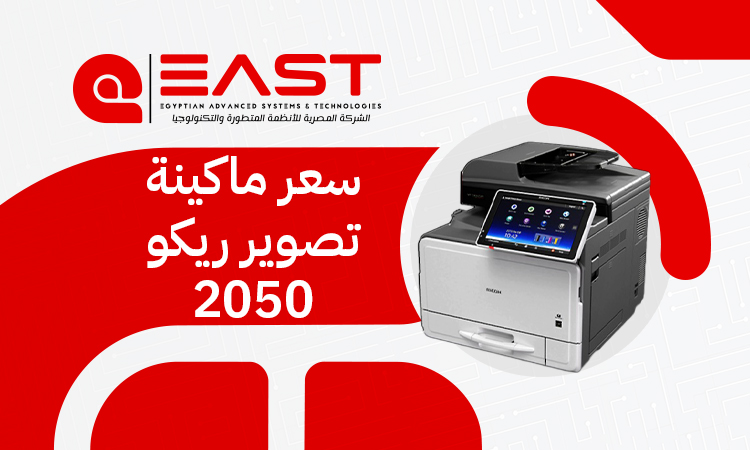
Ricoh Photocopy Machine Price 2026: Models, Features & Costs
Looking for a photocopy machine that blends reliable performance with budget-friendly operating costs without sacrificing output quality? If you want a practical, hardworking device tailored for offices, corporate environments, and copy centers, the Ricoh 2050 remains a highly sought-after option. Its exceptional efficiency and day-to-day dependability have secured its place in the market.
In this comprehensive guide from East Automation, we break down the latest 2026 market rates for imported and used Ricoh 2050 models, detail its core technical specifications, and objectively analyze its pros and cons. Our goal is to help you accurately evaluate this machine and choose the perfect solution for your workflow and budget.
Why the Ricoh Photocopy Machine Remains a Business Favorite
Despite the influx of newer production models, the Ricoh photocopy machine MP C2050 consistently holds its ground as one of the most cost-effective solutions for libraries, corporate offices, and commercial printing shops. When business owners evaluate a Ricoh photocopy machine price, they often discover that this specific model delivers an unmatched balance of high reliability, continuous heavy-duty operation, straightforward maintenance, and highly affordable consumables.
WHY CHOOSE THE MP C2050?
- Heavy-Duty Build: Engineered for demanding daily workflows
- High Duty Cycle: Seamlessly processes thousands of monthly
- pages without frequent breakdowns.
- Widespread Support: Massive regional presence ensures readily
- available spare parts and expert technicians.
The machine features a robust chassis and durable internal components designed to tackle dense daily workflows with stability. This makes it an ideal fit for environments requiring steady document production without disruptive technical downtime.
Furthermore, the widespread presence of the Ricoh brand across regional markets guarantees that replacement parts, genuine or high-quality alternative toners, drums, developer units, and feed rollers are always accessible. This widespread availability helps reduce long-term operational costs, making the overall Ricoh photocopy machine price even more appealing over the lifespan of the equipment.
Additionally, this Ricoh photocopy machine provides quality color output perfect for everyday business documents. Coupled with an intuitive user interface and versatile printing, copying, and scanning features, it offers an incredibly practical solution for small to medium-sized projects aiming to balance productivity with smart spending.
Technical Specifications of the Ricoh Aficio MP C2050
The Ricoh photocopy machine Aficio MP C2050 is a multi-function system engineered to deliver steady, high-quality results. It serves as a dependable asset for teams needing solid productivity alongside minimal overhead costs.
Below is a detailed breakdown of its primary technical specifications to help you assess how it fits into your current Ricoh printers price list comparisons:
Technical Specifications Matrix
|
Technical Feature |
Specifications & Details |
|
Model Name |
Ricoh Aficio MP C2050 |
|
Machine Type |
Multi-function Digital Color Laser Ricoh photocopy machine |
|
Print & Copy Resolution |
$1200 \times 1200$ DPI (Dots Per Inch) for crisp text and vivid colors |
|
Supported Paper Sizes |
A3, A4, A5, B4, B5, A6 |
|
Print & Copy Speed |
20 pages per minute (PPM) for both Color and B&W |
|
Supported Paper Weight |
From 60 gsm up to 256 gsm (via the bypass tray) |
|
Warm-Up Time |
Less than 26 seconds |
|
First Copy Output Time |
6.5 seconds (B&W) / 9.5 seconds (Color) |
|
Standard Paper Capacity |
1,100 sheets (Expandable up to 3,100 sheets with extra trays) |
|
System Memory (RAM) |
1 GB |
|
Hard Disk Drive (HDD) |
60 GB |
|
Connectivity Interface |
Network LAN (Ethernet), USB 2.0 |
|
Monthly Duty Cycle |
Up to 30,000 impressions per month |
Market Pricing Breakdown (2026 Fleet Rates)
When acquiring a Ricoh photocopy machine, local market pricing is a primary deciding factor for business owners and purchasing managers. Because the commercial print market relies heavily on imported hardware, pricing fluctuates depending on the machine’s sourcing, total usage history, and overall hardware condition.
1. Imported "Refurbished / Like-New" Models
Imported units sourced from European or North American corporate environments—often graded as "like-new" or "grade-A refurbished"—are the premier choice for buyers seeking peak operational efficiency near factory standards.
- Price Range: 18,000 to 21,000 Egyptian Pounds (EGP).
- Best For: Users who require high performance, a longer remaining lifespan, and a minimal risk of immediate mechanical component failures.
2. Locally Used Models
Locally traded or pre-owned machines represent a highly economical alternative for startups or businesses operating on constrained budgets.
- Price Range: 14,000 to 16,500 Egyptian Pounds (EGP).
- Best For: Budget-conscious projects. However, these require a thorough technical inspection of the drums, toner levels, and internal gears prior to purchase to prevent unexpected repair overheads.
Key Variables Driving Ricoh photocopy machine price
When looking over a Ricoh printers price list, you will notice that pre-owned or imported hardware does not carry a rigid, fixed price tag. Instead, the final cost of a Ricoh photocopy machine is determined by several core variables:
- Drum Condition & Color Assembly Integrity: The drum units and developer assemblies are the most critical operational parts of the machine. If these components have over 80% of their lifespan remaining, the machine's price increases because you won't need to replace them anytime soon. Conversely, worn-out drums noticeably lower the asset value.
- The Counter (Total Page Volume): The machine's counter is the truest indicator of its mileage and remaining lifespan. Units with a low counter reading (under 50,000 to 60,000 prints) command premium prices. Higher usage counts naturally lower the cost.
- Warranty Coverage & After-Sales Support: Purchasing a machine backed by a clear technical warranty (such as 3 to 6 months) increases the initial cost but offers vital long-term protection. Certified dealer support safeguards your investment against sudden component failures, whereas buying unwarranted machinery carries higher risks.
Comparative Analysis: Ricoh MP C2050 vs. Ricoh MP C3001
When investing in color Ricoh printer models, comparing different generations within the same lineup helps ensure you choose the best fit for your workflow. Below, we compare the Ricoh MP C2050 with an upgraded alternative from the same family, the Ricoh MP C3001, to highlight the practical differences between them.
Face-to-Face Comparison Table
|
Comparison Metric |
Ricoh MP C2050 |
Ricoh MP C3001 (Upgraded Tier) |
|
Print Speed |
20 Pages Per Minute (PPM) |
30 Pages Per Minute (PPM) |
|
Output Resolution |
$1200 \times 1200$ DPI |
$1200 \times 1200$ DPI |
|
Processor & Storage |
1GB RAM / 60GB HDD |
1.5GB RAM / 160GB HDD |
|
Max Paper Weight |
Up to 256 gsm |
Up to 300 gsm |
|
Control Panel |
Standard touch screen with physical keys |
Advanced, responsive color touch screen |
|
System Compatibility |
Reliable for standard tasks; limited legacy OS support |
Enhanced network security and modern OS patching |
|
Duty Cycle Capability |
Designed for medium business use |
Built for high-volume commercial print runs |
|
2026 Market Cost |
Budget-friendly (18,000 – 21,000 EGP) |
Higher investment (Requires an extra 4,000 – 6,000 EGP) |
Addressing the Performance Trade-offs and Disadvantages
While a Ricoh photocopy machine like the MP C2050 offers excellent value, every hardware system has specific limitations that you should consider before making a final purchasing decision:
- Moderate Print Speeds: At 20 pages per minute, this speed is ideal for mid-sized offices but can create a bottleneck in high-traffic copy centers or student copy shops during peak hours.
- Sensitivity to Dust and Environmental Humidity: The precision color drums and charge rollers in these specific Ricoh printer models are sensitive to their surroundings. Operating the machine in dusty or humid environments can lead to print artifacts like thin white lines or faded colors, which means you'll need to clean it regularly.
- Heavy Cardstock Restrictions: Although the system supports heavier paper stocks like glossy or coated media via the bypass tray, feeding heavy paper (over 200–220 gsm) all the time can accelerate wear on the pickup rollers and cause occasional paper jams.
- Legacy Firmware Limitations: Because this model belongs to an earlier production generation, configuring it on modern network infrastructures (like Windows 11 or mobile printing environments) may require specialized driver tuning by an IT technician.
- Color Consumable Replacement Expenses: While day-to-day toner consumption is highly economical, replacing entire imaging components—such as a full set of color drums or developers simultaneously—can be a significant expense relative to the machine's base price.
Pro Tip for Longevity: These drawbacks do not mean the machine is unreliable; they simply define its ideal working limits. If your monthly print volume ranges between 10,000 and 15,000 impressions and you maintain a clean office environment, this machine will provide outstanding service with minimal issues.
Secure Your Investment with East Automation
Maximizing your return on a Ricoh photocopy machine depends on sourcing your equipment from a trusted partner who guarantees hardware verification and authentic post-sale support.
This is where East Automation stands out. We make sure every imported or pre-owned machine undergoes rigorous technical testing by specialized maintenance engineers before delivery.
By providing verified equipment, long-term technical support, and genuine replacement parts, East Automation ensures your business enjoys stable performance and a secure, predictable investment. Contact us today to check current inventory availability and find the right hardware match for your business.
Frequently Asked Questions (FAQ)
Are spare parts for this Ricoh photocopy machine readily available?
Yes, spare parts and consumables for this model are widely available across regional markets due to its popularity. However, certain specialized internal components are best sourced through authorized suppliers like East Automation to ensure authenticity.
What is the expected lifespan of the imaging drum unit?
The standard imaging drum unit yields approximately 60,000 to 80,000 impressions. This lifespan depends on using high-quality toner compounds and keeping up with routine preventive maintenance.
Does the base model support direct network connectivity out of the box?
Network print capabilities via LAN are standard on most imported configurations. However, it is always wise to confirm the internal print-card installation with our technical team prior to finalizing delivery, as some base regional variations may differ.